Taking a break from Instagram is easy. Getting back on it should be just as simple. If you temporarily deactivated your account and you’re ready to return, the reactivation process takes less than a minute as long as you still have your login credentials.
This guide walks you through every reactivation scenario: mobile app, desktop browser, and what to do if something goes wrong. It also covers what to expect after you log back in.
Can You Reactivate a Deactivated Instagram Account?
Yes. Instagram’s temporary deactivation feature is designed to be fully reversible. When you deactivate your account, Instagram hides your profile, posts, comments, and followers from other users but keeps everything saved on their servers. The moment you log back in, all of it reappears.
Two important things to know before you start:
- Instagram allows only one deactivation per week. If you’ve already deactivated and reactivated within the past seven days, you’ll need to wait before deactivating again.
- Temporary deactivation has no time limit. You can reactivate after a day, a month, or a year.
How to Reactivate Instagram on Mobile (App)
This works on both iPhone and Android:
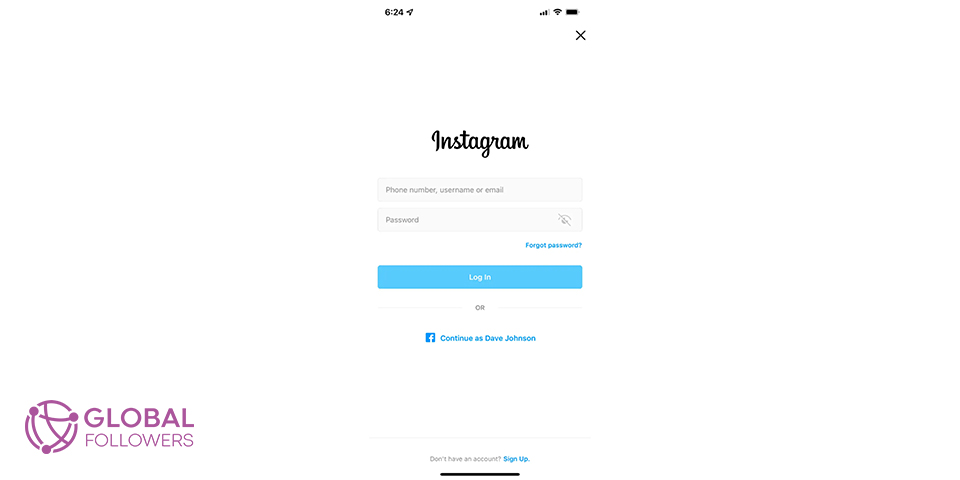
- Open the Instagram app on your phone.
- On the login screen, enter the username, email address, or phone number tied to your account.
- Type your password and tap Log In.
- If prompted, complete any security check (such as a verification code sent to your email or phone).
- Your account is now live again. All your posts, followers, and profile information will be restored immediately.
If Instagram asks you to agree to updated Terms of Service before proceeding, review and accept them to complete the reactivation.
How to Reactivate Instagram on Desktop (Website)
- Open a browser and go to instagram.com.
- Click Log in.
- Enter your credentials and click Log in again.
- Complete any security verification if Instagram requests it.
- Your account reactivates instantly once you’re signed in.
Desktop reactivation works the same as mobile the platform doesn’t distinguish between the two for this purpose.
What to Expect After Reactivation
Will My Followers, Posts, and Profile Return?
Yes, everything is restored immediately. Your follower count, following list, posts, Reels, saved content, Stories archive, and bio all return to exactly the state they were in when you deactivated. Nothing is deleted.
Will My Engagement Return to Normal?
Not immediately. Instagram’s algorithm takes time to reassess your account’s activity level and audience engagement after a period of inactivity. Expect a gradual recovery rather than an instant return to previous reach.
What helps speed things up:
- Post consistently within the first two weeks of returning
- Engage actively with comments and replies
- Use Stories every day to signal activity to the algorithm
- Interact with content from accounts in your niche
Most accounts see meaningful engagement recovery within two to four weeks of consistent activity.
What If You Can’t Reactivate Your Account?
Forgot Your Password
- On the login screen, tap Forgot password?.
- Enter your email address, phone number, or username.
- Follow the reset instructions sent to your email or phone.
- Once your password is reset, log in to reactivate.
Account Was Permanently Deleted
If you permanently deleted your Instagram account (rather than temporarily deactivating it), the account cannot be recovered. Instagram permanently deletes all data associated with a deleted account there is no reversal. You would need to create a brand new account.
Account Was Disabled by Instagram
If Instagram disabled your account for violating Community Guidelines, the standard login process won’t work. You’ll see a “Your account has been disabled for violating our terms” message instead. In this case:
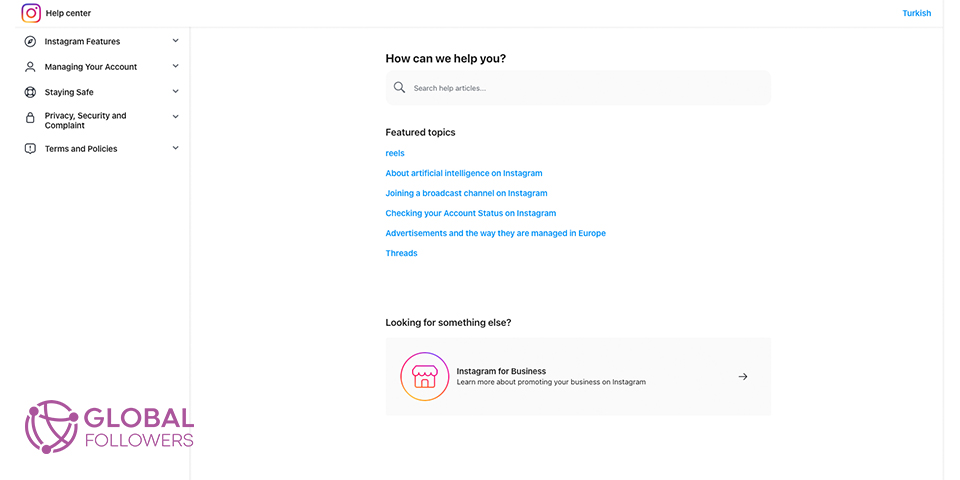
- Visit the Instagram Help Center at help.instagram.com.
- Select the option to appeal a disabled account.
- Submit your appeal with any relevant information.
- Wait for Instagram’s review team to respond this can take several days.
Appeals are not always successful, particularly for serious violations. There is no guaranteed recovery path for accounts disabled by Instagram.
How to Deactivate Your Instagram Account Again
If you want to take another break after reactivating, the process is straightforward. Keep in mind the one-week wait between deactivations.
- Pick a reason from the dropdown, enter your password, and confirm.
- Log into your account on the app or website.
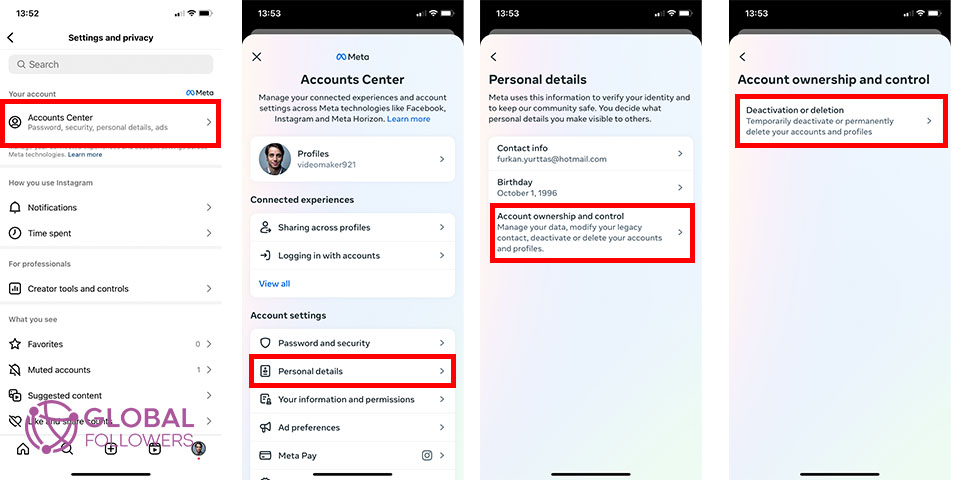
- Go to your profile and tap the menu (three lines, top right).
- Select Settings and Privacy, then Account.
- Tap Accounts Center and then Personal Details.
- Choose Deactivation or Deletion.
- Select your account and choose Deactivate Account.
Frequently Asked Questions
How long does it take to reactivate an Instagram account?
Reactivation is instant. The moment you log in, your account goes live again and all your content is restored. The only delay might be a verification step if Instagram detects a new device or location.
Can I reactivate Instagram after a long time?
Yes. There’s no expiration date on a temporarily deactivated Instagram account. Whether you’ve been away for two weeks or two years, the reactivation process is the same just log back in. However, if Instagram updated its Terms of Service during your absence, you’ll need to accept the new terms before proceeding.
Will people know I deactivated my Instagram?
Instagram doesn’t send any notification when you deactivate. Your profile simply disappears from search results and your username shows as unavailable. When you reactivate, your profile reappears without any announcement. People following you may notice you were gone if they tried to find your profile, but there’s no official notification either way.
Can I reactivate Instagram without the original phone number?
You can reactivate using your email address or username instead of your phone number. As long as you know your password and one valid login identifier (email, username, or phone), you can get back in. If you’ve lost access to all of them, you’ll need to go through Instagram’s account recovery process via the Help Center.
Can you reactivate a permanently deleted Instagram account?
No. Once an Instagram account is permanently deleted, the data is removed from Instagram’s servers and recovery is not possible. This is different from temporary deactivation, which is fully reversible. If you permanently deleted your account, you’ll need to start fresh with a new one.

Instagram Insights and content impressions play a crucial role in understanding your account’s performance and how widely your posts are being seen ac...

Instagram Saves are a powerful yet often underutilized engagement metric that signals deep audience interest by allowing users to bookmark posts they ...



No comments to show.