Sometimes you need a break from social media, and Twitter makes that possible without permanently deleting your account. Deactivating your Twitter account temporarily puts it on hold for up to 30 days, during which you can change your mind and restore everything. If you do not log back in within that window, Twitter permanently deletes the account.
This guide walks through exactly how to deactivate your Twitter account on iPhone, Android, and desktop, what happens to your data in the meantime, and how to bring your account back when you are ready.
What Does Deactivating Twitter Actually Do?
Deactivating your Twitter account is not the same as deleting it. When you deactivate, Twitter hides your profile, tweets, and interactions from the public. No one can search for your username or find your content during the deactivation period.
Your data stays intact on Twitter’s servers for 30 days. This gives you a clear window to reconsider. If you log back in at any point within those 30 days, your account is restored exactly as you left it, including your followers, following list, tweets, and DMs.
After 30 days without logging in, Twitter begins the permanent deletion process. This is irreversible, so set a reminder if you plan to reactivate.
How to Temporarily Deactivate Twitter on iPhone and Android
The process on mobile is the same whether you use iOS or Android. Follow these steps:
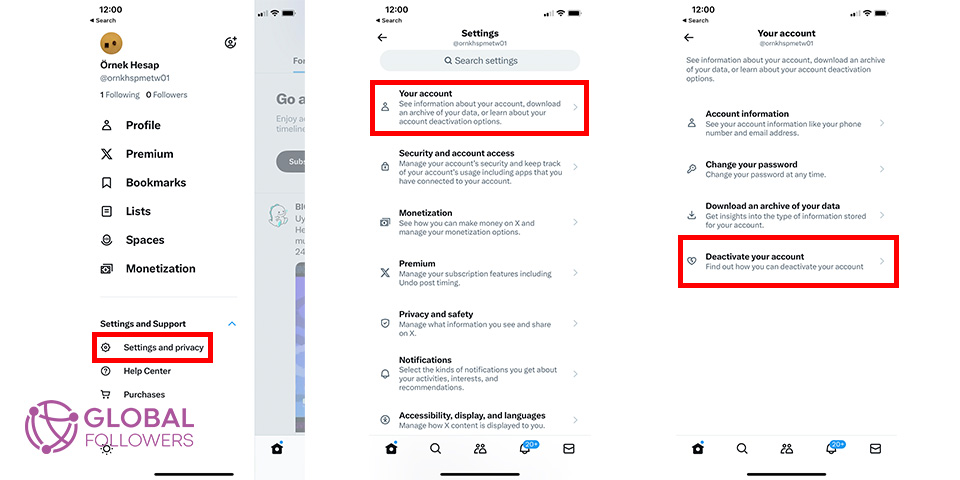
- Open the Twitter app and tap your profile icon in the top-left corner.
- Tap “Settings and Support,” then select “Settings and privacy.”
- Go to “Your account,” then tap “Deactivate your account.”
- Read the deactivation information on the screen.
- Tap “Deactivate” at the bottom.
- Enter your password to confirm.
- Tap “Deactivate account” once more to finalize.
The screen will confirm the deactivation. Your profile will immediately become invisible to other users. You can reactivate at any time by logging back into the app.
How to Temporarily Deactivate Twitter on Desktop (PC/Mac)
If you prefer to use a browser, the desktop process is slightly different in layout but follows the same logic:
- Go to twitter.com and log into your account.
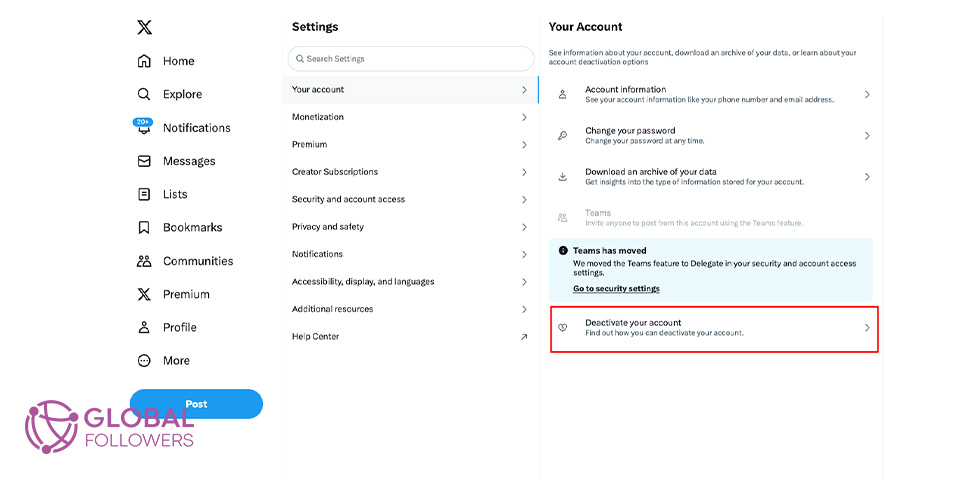
- Click “More” in the left sidebar, then select “Settings and Support.”
- Click “Settings and privacy,” then “Your account.”
- Select “Deactivate your account” near the bottom of the list.
- Review the deactivation information and click “Deactivate.”
- Type your password and click “Deactivate account” to confirm.
Your account is now deactivated. No one can see your profile or find you through Twitter search until you log back in.
What Happens After You Deactivate Your Twitter Account
Several things change immediately after you deactivate:
- Your profile becomes invisible. Anyone who visits your profile page sees a “This account does not exist” message.
- Your tweets disappear from search results and timelines.
- Your followers and following count are hidden.
- Your direct messages are inaccessible during the deactivation period.
- Third-party apps connected to your account will lose access.
What does not change: your data is preserved on Twitter’s servers during the 30-day period. If someone had already saved or screenshotted your tweets, that content exists outside of Twitter’s control. Deactivation does not retroactively erase content that has been copied or shared.
If you are deactivating because of security concerns, you might want to read our guide on how to see how many people blocked you on Twitter before you go, in case there are specific accounts you want to handle first.
Twitter Deactivation vs Account Deletion: Key Differences
| Feature | Deactivation | Deletion |
| Data preserved | Yes (30 days) | No (permanent) |
| Profile visible | No | No |
| Reversible | Yes (within 30 days) | No |
| Followers retained | Yes (if reactivated) | No |
| Tweets retained | Yes (if reactivated) | No |
| How to trigger | Deactivate then wait | Let deactivation expire |
The key practical difference is reversibility. Deactivation is a pause; deletion is permanent. If you are not 100% certain you want to leave Twitter forever, always deactivate rather than delete.
How to Reactivate Your Twitter Account
Reactivating is simple, provided you do it within the 30-day window:
- Open the Twitter app or go to twitter.com.
- Enter your username (or email/phone number) and password.
- Tap or click “Log in.”
- Twitter will restore your account and present a confirmation screen.
Your profile, tweets, followers, and following list will all return to the state they were in before deactivation. Some follower accounts that were deactivated or deleted during your absence will not appear, since those are gone regardless.
Having trouble logging back in? Our post on what to do if you forgot your Twitter password and email covers account recovery in detail.
What Happens If You Miss the 30-Day Reactivation Window
If 30 days pass without you logging in, Twitter begins permanently deleting your account. The deletion process can take a few additional days after the 30-day mark, so you may have a brief grace period, but Twitter does not officially guarantee it.

Twitter profile clicks are a strong indicator of interest, and for brands, creators, and businesses, increasing these clicks supports credibility, gro...

Twitter (X) remains a powerful force in digital marketing with over 500 million monthly active users in 2025, thriving through real-time engagement, n...
Once the permanent deletion is complete, your username becomes available for others to register. Your tweets, followers, DMs, and profile information are gone permanently. Twitter does not offer a recovery option after this point.
If your account was suspended rather than deactivated, the process is different. See our guide on
how to unsuspend a Twitter account for a full breakdown of the appeal process.
Rebuild Your Twitter Presence with GlobalFollowers
If you have just come back from a Twitter break and want to rebuild your presence quickly, GlobalFollowers offers services that help you regain traction without starting from zero:
Buy Twitter Followers to restore social proof and make your profile look active again.



No comments to show.